JournE1.0.4
Publisher Description
JournE is the easy way to monitor and record your journey!
You can easily share your journey info by email then view in Google Earth
At work - transport manager, driving instructor, taxi driver, travelling rep, pilot, sailor...
At play - track day laps, holiday flights, cycling, camping & hiking trips...
-
Secure your iPhone or iPad firmly in a holder where you can clearly see it
When on level ground, tap the level indicator to set at zero
Tap REC to start/stop recording up to 10 hours in a continuous loop
1 - 5 second delay between samples
-
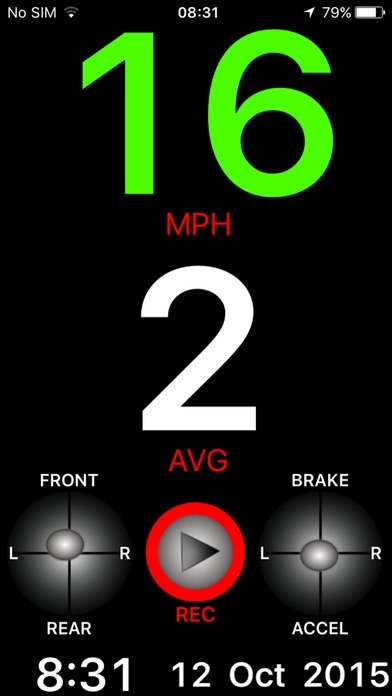
Main Display:
Your speed in MPH, KPH or Knots - tap to give colour indication of speed
Your average speed - tap to enable/disable current average
Level indicator - tap to zero when on level ground
Record button - tap to stop/start recording
Motion indicator displays current G force
Time - tap to toggle 12/24 hour
Date - tap to toggle day/month order
-
Settings:
Slide screen from left to right to access settings
MPH / KPH / KTS - change speed unit
Sample every 1 - 5 seconds for 2 - 10 hours recording loop
Slide switch to enable/disable "Beep - level"
Tap CLEAR to show and reset all data
Tap SAVE to email a record of the last journey
-
You can send your recording by email to your desktop PC then view with Google Earth
Send as time stamped way points or route or both
Each way point shows a direction marker with:
Time and date
Speed - MPH, KPH or KTS
Average speed - MPH, KPH or KTS
Heading in degrees and 16 point cardinal direction
Level - Pitch, roll & yaw in degrees
Motion - Braking/accelerating, left/right, up/down in gravity units (G-force)
-
Can run in the background so other apps such as SatNav can be used at the same time
Tap "Allow" when asked about background location tracking for this to operate correctly
Requires iOS 7.0 or later. Compatible with iPhone, iPad, and iPod touch.
About JournE
The company that develops JournE is Mike Hughes. The latest version released by its developer is 1.0.4.
To install JournE on your iOS device, just click the green Continue To App button above to start the installation process. The app is listed on our website since 2015-10-31 and was downloaded 9 times. We have already checked if the download link is safe, however for your own protection we recommend that you scan the downloaded app with your antivirus. Your antivirus may detect the JournE as malware if the download link is broken.
How to install JournE on your iOS device:
- Click on the Continue To App button on our website. This will redirect you to the App Store.
- Once the JournE is shown in the iTunes listing of your iOS device, you can start its download and installation. Tap on the GET button to the right of the app to start downloading it.
- If you are not logged-in the iOS appstore app, you'll be prompted for your your Apple ID and/or password.
- After JournE is downloaded, you'll see an INSTALL button to the right. Tap on it to start the actual installation of the iOS app.
- Once installation is finished you can tap on the OPEN button to start it. Its icon will also be added to your device home screen.
